Contacts that fit the way you work - and the people you share them with.
Contacts Pro takes over the built-in Contacts screen and adds what a growing business needs: your contacts brought in from Google, a phone or Outlook, your own fields, birthdays with reminders, groups with their own look, faster editing, and sharing contacts or whole groups with colleagues. It works on the same contacts, so nothing moves and nothing is lost.

What Contacts Pro does for you
Bring your contacts with you
Import from Google Contacts, an iPhone, Android or Outlook, or any spreadsheet. A preview spots the people you already have and merges them instead of doubling up, and an import can be undone for a day.
Your own fields
Text, number, date, yes/no, choice, link, email and phone. Show up to three as columns and filter by them.
Birthdays
Date of birth with or without the year, ages, a coming-up strip, a sidebar reminder and a notice on the day.
Groups with a look
Give each group an emblem, colour and style so a VIP or a supplier stands out at a glance.
Sharing
Share one contact, a selection or a whole group with everyone, a role or named people - to view, or to edit.
Faster editing
Sort by any column, double-click a cell to change it, move through the list by keyboard.
On your calendar
Birthdays show as all-day items on the Calendar Tool.
Call them now
Choose Call (name) now… on a contact. A video call opens on your own site, they are emailed a Join link, and the contact keeps a list of your recent calls with them.
A look inside
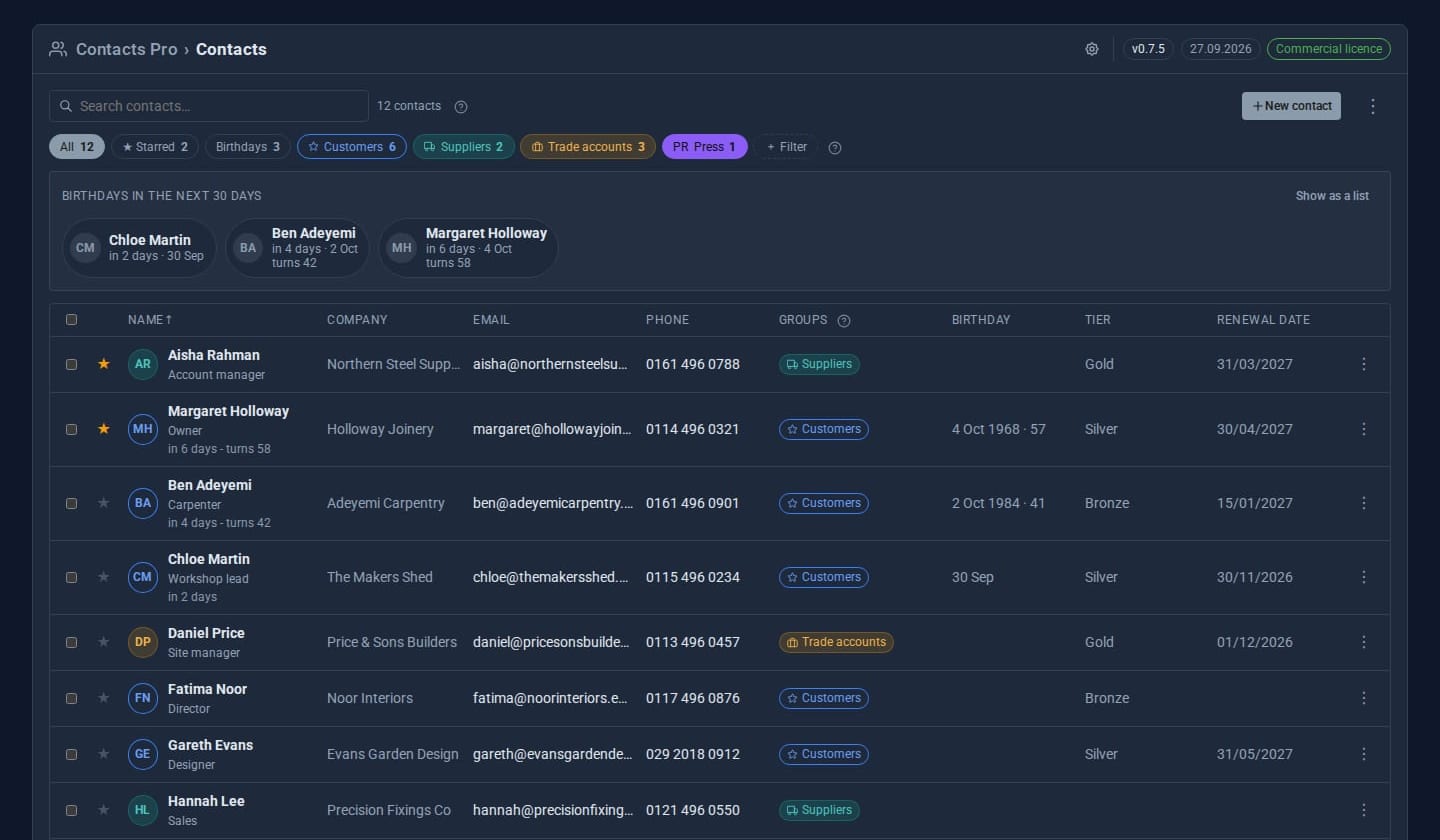
Screens from our ACME Ltd demo site. Every name in them is made up.
See it in 5 minutes
- Switch on Contacts Pro. The Contacts entry in the sidebar now opens the Pro screen, on the same contacts.
- In Google Contacts choose Export and save a Google CSV. Back in Contacts, open the menu, choose Import contacts and drop the file in. Check the preview and press Import - your Google labels arrive as groups.
- Open the menu and choose Custom fields. Add *Tier* as a choice of Gold, Silver and Bronze.
- Show Tier as a column, then filter the list to Gold.
- Add a date of birth to a contact and watch the coming-up strip.
- Select a group's chip, choose Share, and give your sales role view-only access.
What Pro adds to the built-in Contacts
Contacts (built-in)
- A personal address book per user
- Several addresses, emails and phones; billing and bank details
- Shared groups and starred contacts
- Search, bulk actions, JSON import and export
Contacts Pro Pro adds
- Import from Google, phones and Outlook, with duplicates merged and a 24-hour undo
- Export to vCard, for Google or a phone
- Custom fields, shown as columns and filters
- Birthdays, ages, reminders and a calendar layer
- Group emblems and colours
- Share contacts or groups to view or edit
- In-place editing and keyboard navigation
- "Call (name) now…" video calls, from a contact or an email
Good to know
Switch Contacts Pro off, or let the licence lapse, and the built-in Contacts screen returns with every contact where it was.
What it needs
The built-in Contacts Tool, switched on. Domma CMS 0.93 or later.
Questions
Yes. In Google Contacts choose Export, pick Google CSV or vCard, and import the file. Google's labels become groups and starred contacts keep their star. An iPhone, Android phone or Outlook export works the same way, and so does a spreadsheet saved as CSV - you choose where each column goes. Up to 5,000 contacts at a time.
The preview matches them by email address, then by phone number however it is written. You choose for each one: merge, add as new, or skip. Merging only fills in what is missing and adds new emails, phones and groups - it never changes what you already have. Someone who only shares a name is flagged but added separately unless you say otherwise.
For 24 hours. Undo removes the contacts the import added, but keeps any you have edited since. Details merged into existing contacts stay.
The person who created it, or anyone given Contacts > Manage groups. Everyone else sees those buttons greyed out, with a note saying why.
Anyone whose role holds the Calls permission - Admin has it. You can call your own contacts and ones shared with you. The Join link lasts three hours, and the person knocks for you to let them in. About video calls.
No. Only the owner can delete, star or re-share a contact. Others see a label such as "Shared by Sam - view only".
Learn it step by step
Goes well with
Add Contacts Pro to your site
Contacts Pro is a Pro Tool. Tell us about your site and we will set it up with you.